विवरण
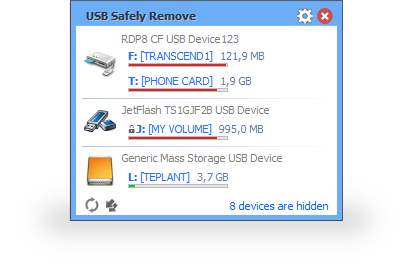
USB Safely Remove provides a central menu for stopping removable USB devices before disconnecting them. A system-tray interface lists connected devices, which is useful when several external drives or memory-card devices are attached at once.
The application also supports events that run before a device is stopped and a command-line interface for scripted workflows. These functions can connect device removal to an existing backup or other local task, while the device list provides a consistent place to select which attached device to stop.
Features include: System-tray control for stopping connected USB devices; A consolidated view of removable devices; User-defined events before stopping a device; Command-line support for scripted tasks.
सॉफ़्टवेयर की जानकारी
विषयों
चित्र
This picture is temporarily unavailable.
इंस्टॉलेशन गाइड
Choose the file group for your version and platform. Keep multipart files from the same release together and follow the supplied setup instructions.
संसाधन डाउनलोड करें
एक संस्करण चुनें और इसके हिस्सों को एक साथ रखें. विकल्प प्रदाता सूचीबद्ध होने पर उपलब्ध हैं.
USB Safely Remove 7.5.1.1339 Multilingual
सीधे डाउनलोड
7.5.1.1339
USB Safely Remove 7.1.2.1327 Multilingual Portable
सीधे डाउनलोड
7.1.2.1327
USB Safely Remove 6.4.3.1312 Multilingual
सीधे डाउनलोड
6.4.3.1312
USB Safely Remove 6.4.2.1297 Multilingual
सीधे डाउनलोड
6.4.2.1297
USB Safely Remove 6.3.2.1286 Multilingual Portable
सीधे डाउनलोड
6.3.2.1286
आकार
Installed version: 3 MB
अपनी राय दें
पोस्ट की गई टिप्पणियाँ तुरंत दिखाई देती हैं।